
Dual Section Block
The Dual Section Block is a highly versatile component for creating two-column layouts. It allows you to place content side-by-side with an image or text, another block of text, a list of enquiries, or even a shortcode-based element.
Content Editor Fields
Style Options
-
Disposition:
- Description: Controls the horizontal arrangement of the two columns, when Type is
Text/Image. - Options:
Image Left: The content appears on the right, and the image on the left.Image Right: The content appears on the left, and the image on the right.
- Usage: Select the desired layout order.
- Requirement: Default is
Image Left.
- Description: Controls the horizontal arrangement of the two columns, when Type is
-
Type:
- Description: Defines the kind of content that will be displayed in the two columns.
- Options:
Text/Image: A single content block next to an image.Text/Text: Two distinct content blocks side-by-side.Text/Enquiries: A content block next to a list of "enquiry" items.Text/Shortcode: A content block next to a custom shortcode.
- Usage: Choose the structure that best fits your needs.
- Requirement: Default is
Text/Image.
-
Heading Styles:
- Description: Defines the font family for heading.
- Options:
Theme Font Style: Default font family from the themeSpecail font style: Good dog font family.
-
Heading Size:
- Description: Defines the font family for heading.
- Options:
Small: H4 sizeMedium: h3 sizeLarge: h2 size
Content Fields
-
Content (Column 1):
- Description: A group of fields for the primary content column.
- Usage: Fill in the text content for the first column.
- Fields:
- Heading: The main title for the section. (Optional)
- Subheading: A smaller subtitle displayed below the main heading. (Optional)
- Excerpt: The main body of text for this column. (Optional)
-
Content (Column 2 - Conditional):
- Description: These fields appear when the Type is set to
Text/Text. - Usage: Fill in the content for the second text-based column.
- Fields:
- Heading Two: The heading for the second content block. (Optional)
- Subheading Two: The subheading for the second content block. (Optional)
- Excerpt Two: The body text for the second content block. (Optional)
- Description: These fields appear when the Type is set to
-
Enquiries (Conditional):
- Description: A repeater field that appears when the Type is set to
Text/Enquiries. - Usage: Add one or more "enquiry" items, each with a title, description, and price.
- Fields (per item):
- Enquiry Title: The title of the enquiry item (e.g., "Adult Ticket").
- Enquiry Excerpt: A short description.
- Enquiry Price: The price or cost associated with the item.
- Description: A repeater field that appears when the Type is set to
-
Shortcode (Conditional):
- Description: A text field that appears when the Type is set to
Text/Shortcode. - Usage: Enter a WordPress shortcode to render a form or other dynamic content in the second column.
- Description: A text field that appears when the Type is set to
-
Images:
- Description: The image to be displayed in the section.
- Usage: Upload an image. This is used when Type is
Text/Image. If left empty, the page's featured image will be used as a fallback. - Requirement: Optional.
-
CTAs (Call-to-Action Buttons):
- Description: A repeater field to add one or more buttons to the primary content column.
- Usage: Add buttons to link to other pages or resources.
- Fields (per button):
- URL: The destination link for the button.
- Title: The text displayed on the button.
Example Usage:
Steps:
- Add the block: Insert the Dual Section Block into your page.
- Choose Style:
- Set Disposition to
Image Right. - Set Type to
Text/Enquiries.
- Set Disposition to
- Add Content (Column 1):
- Heading: "Plan Your Dive"
- Subheading: "Everything you need to know"
- Excerpt: "Our shark diving experience is a once-in-a-lifetime opportunity. Below are the available packages."
- Add Enquiries (Column 2):
- Click "Add Enquiry"
- Enquiry Title: "Junior Shark Encounter"
- Enquiry Excerpt: "For ages 10-15. Full instruction provided."
- Enquiry Price: "£150"
- Click "Add Enquiry" again
- Enquiry Title: "Adult Shark Dive"
- Enquiry Excerpt: "For ages 16+. No diving experience required."
- Enquiry Price: "£200"
- Click "Add Enquiry"
- Add a CTA:
- Click "Add CTA"
- Title: "Book Now"
- URL: "/booking"
- Click "Add CTA"
- Save the Page: The block will now display the content next to the list of enquiry packages.
Result:
The Dual Section Block renders a clean, two-column layout. Based on the settings, it will dynamically arrange the content, whether it's text, images, lists, or forms, providing a structured and easy-to-read presentation.
Preview with image:
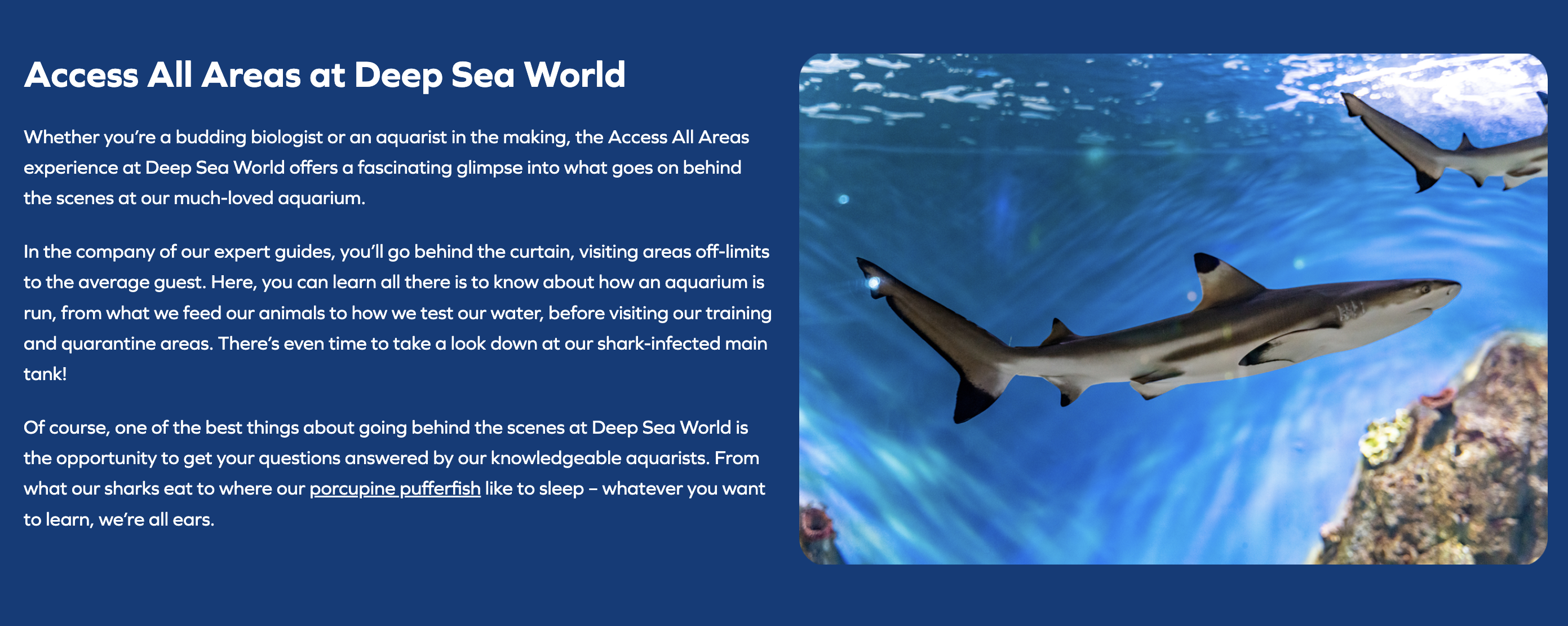
Editor preview:
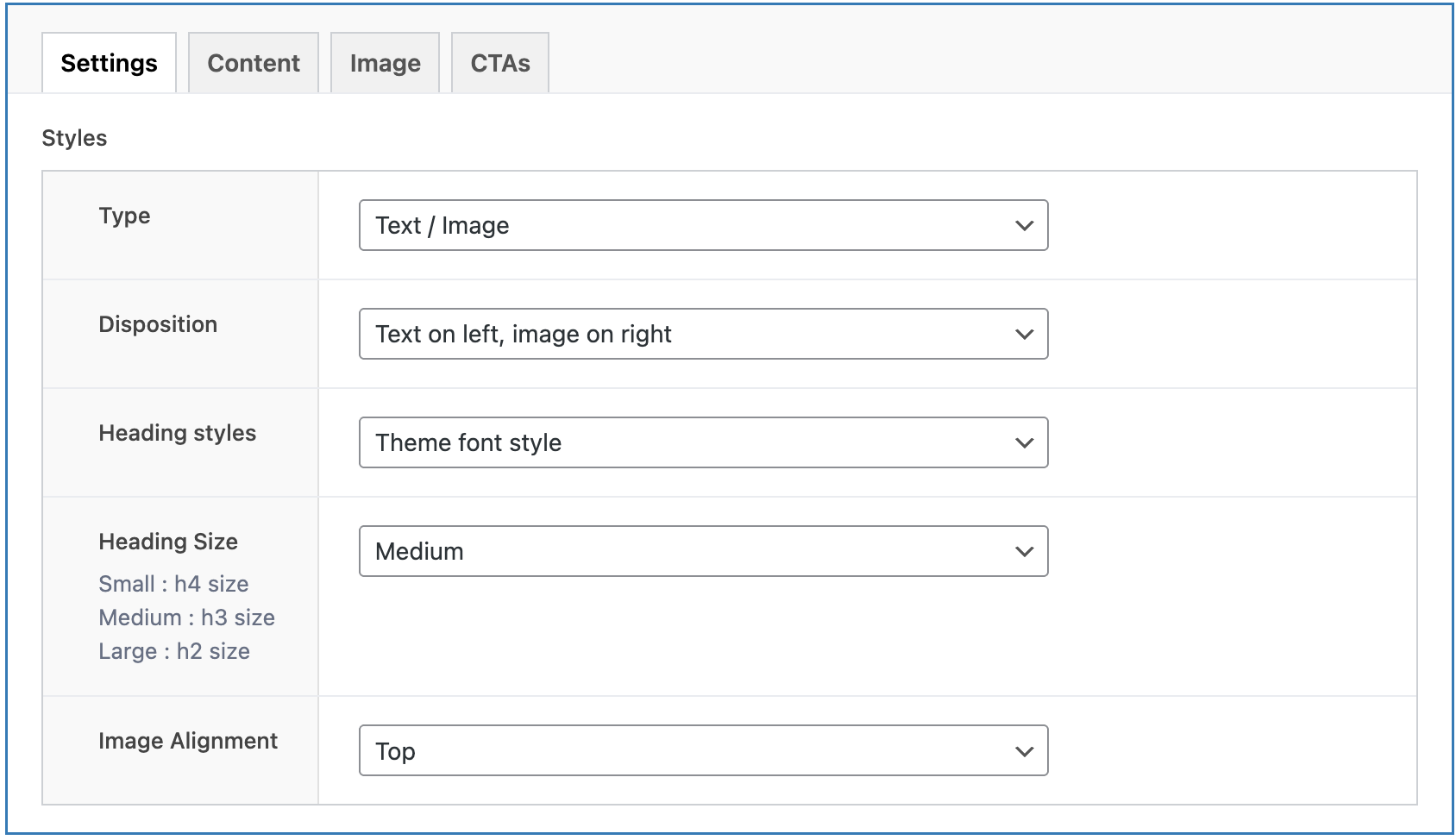
Benefits:
- Flexible Layouts: Easily switch between left/right alignment.
- Multiple Content Types: Supports various combinations of content, making it suitable for feature highlights, service lists, contact sections, and more.
- Structured Information: Ideal for presenting information that benefits from a side-by-side comparison or pairing text with a visual aid.
- Dynamic Content: Can integrate with other plugins via shortcodes for extended functionality.
Conclusion:
The Dual Section Block is a powerful tool for creating sophisticated two-column layouts without needing to write any code. Its flexibility in handling different content types makes it an essential component for building engaging and informative page sections.